
Like many developers, I’ve spent a lot of my career jumping between project management tools, tho it's usually been Jira for work stuff. For personal projects tho, Trello has been exactly what I needed. It is a solid tool, and I have no complaints about how it functions.
However, I recently hit a point where my project needs shifted. Because of my recent project plan restructuring, I needed a little more flexibility, as well as additional features like calendar view, projects, and sprints to coordinate my work cycles. Unfortunately, getting this in Trello required upgrading to the highest tier.
While this included a lot of enterprise-level functionality that is probably worth the cost, I simply don’t need that much as a solo developer.

Don't get me wrong; as a devleoper, I am always happy to pay for good software! Unfortunately in this case, the jump felt like overkill for my narrow use case.
After a bit of searching through multiple alternatives, I stumbled upon Superthread, and I immediately found it to be exactly what i needed! Although certainly not as mature, established, or full-featured as Trello, it is fast, nimble, and iterating quickly. Plus the pricing model actually makes sense for someone at my scale, with a "pay what you want" model giving me a chance to try it out without breaking the bank!
Why Superthread Works For Me
Many tools today seem to cater to either the ultra-simple "to-do list" crowd or the massive "corporate Jira" crowd. There isn't always a lot of room for the independent builder who needs professional features without the heavy overhead or multiple tiers locking specific features. Superthread seems to be doing a great job of filling that need, with a single premium tier and flexible pricing.
As I started setting up my current projects into Superthread, I really appreciated the structure and organization of the interface. Most project managers force you to select and work on one board or project at a time.
Superthread not only supports multiple, unlimited spaces and boards, but lets you open multiple views of those spaces on the same page, letting you move cards between a backlog, current or future sprint, and any other boards you create in between.
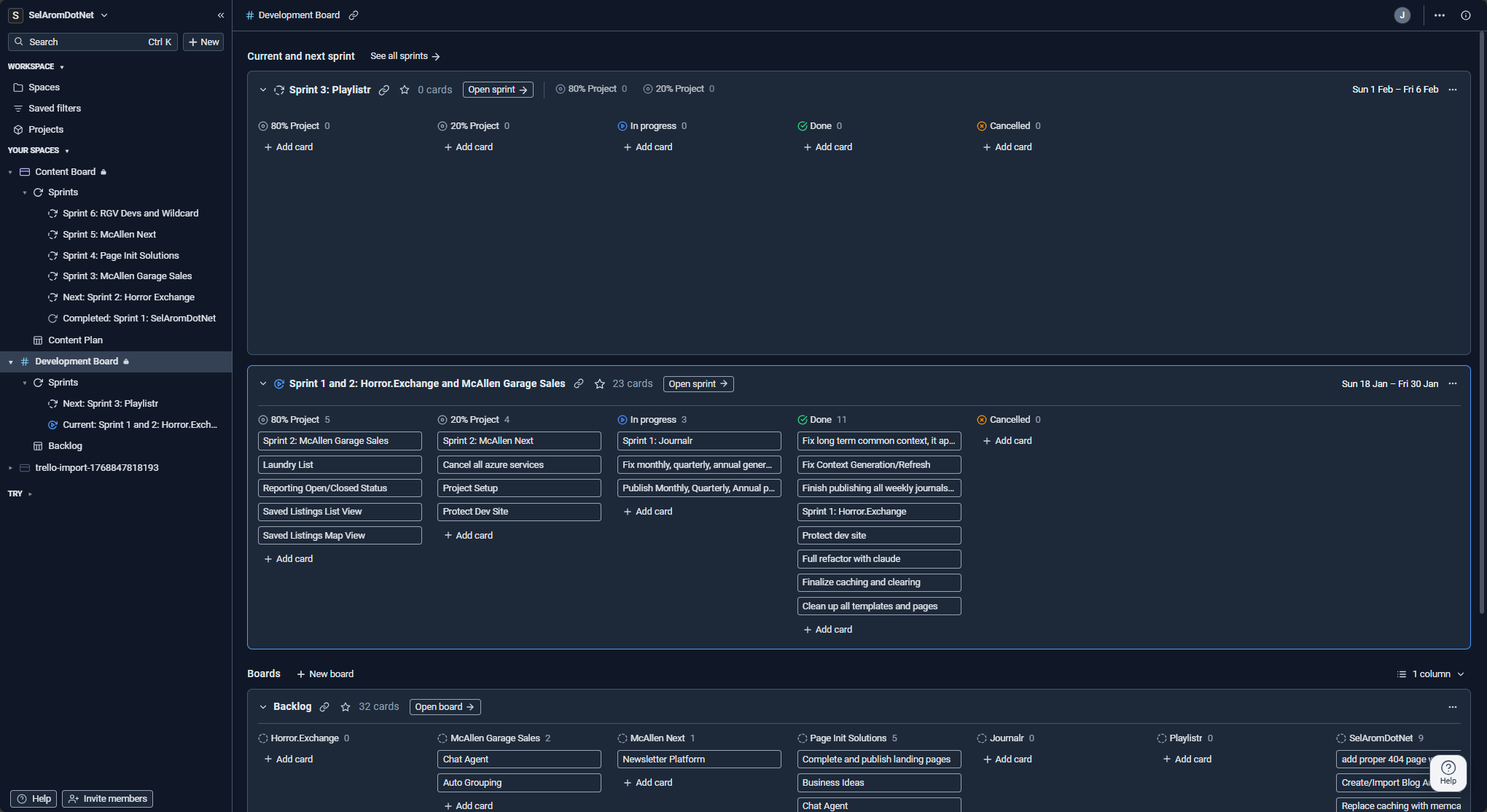
All of the spaces and boards are also accessible in a sidebar/treeview so your entire workspace is just a click away! This was especially nice for me as I'm always working on several things in several different areas. In addition, since I've split my work into content and development, having separate spaces for them makes it easy to context switch but still have it all in one place.
But the key decider came when I realized I could finally organize my work by its actual rhythm rather than forcing everything to share the same workflow.
Different Rhythms for Different Work
The feature that really solidified my switch was the ability to set unique sprint cadences for different spaces. This was something I couldn't find in any other tool, at least not one that was as simple (and affordable!) as Superthread.
I have one space for Development (building, fixing, and prototyping) and another for Content (writing and research). These two types of work move at different speeds.
Development benefits from a two-week sprint. This gives me plenty of time to get through development, testing, and releasing my changes.
Content isn't as demanding, at least not at the level I produce. I set that space to a one-week cycle so I can assign, research, draft and publish without feeling like I am constantly racing against a deadline.
In Superthread, these spaces coexist perfectly. I can see everything on a unified calendar, but the individual boards respect the rhythm of the work being done. It is the first time a PM tool hasn't felt like a chore to update.
It just supports the plan I already had in my head and I no longer have to try and juggle all these projects in my head at different speeds!

A Fair Approach to Premium Features
The pricing is also worth another mention. They are currently offering a "pay what you want" tier that is incredibly generous and certainly appreciated! It allowed me to access the calendar and sprint features that I was looking for without feeling like I was being penalized for being a small-scale user.

I’m still exploring features and look forward to trying things out like swim lanes, child cards, projects, and especially the Github integration so I can link these directly to my branches!
For now, I’m just enjoying the fact that I can quickly write up my six week plan in a few minutes with a simple tool and get right back to the actual work!
Wrapping Up & Next Steps
If you are in a position where your current tool feels a bit too rigid, or the upgrade path feels like it is meant more for a project manager instead of a developer, Superthread is definitely worth a look. For me it wasn't about rejecting the old tools; it is about finding the one that aligns with how I actually build.
TL;DR: Superthread is a fast, fairly priced alternative that excels at handling different work cadences. The "Sprints per Space" feature is a real treat for multi-project developers (as if there is any other kind!)
I'm curious if anyone else has made a move recently. What was the "one feature" that finally made you switch your stack?
Check it out here: Superthread.com
And as always, thank you for reading and I hope this was helpful!
Comments